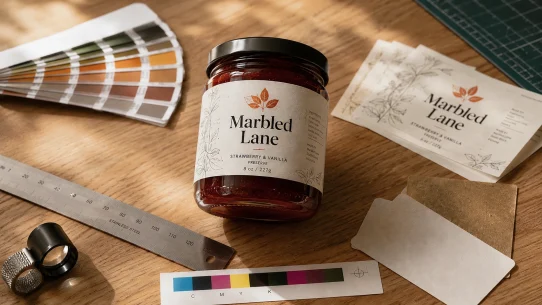


Kittl at $15 a month gives a small product business a practical path from a pre-built template to a print-shop-ready CMYK PDF in five to forty minutes. Templates do most of the design work while text edits, palette reduction and one library illustration produced a Marbled Lane 8 oz preserves label suitable for production testing. The question this review answers is simple: would a commercial digital label printer accept a label produced with Kittl’s template workflow? Our testing indicates yes, with minor operator judgement still required before sending the file to press.
Scope of review
This review evaluates Kittl’s template-based workflow for producing commercial label artwork. Other workflows available within Kittl were not evaluated and fall outside the scope of this review.
Marbled Lane test results
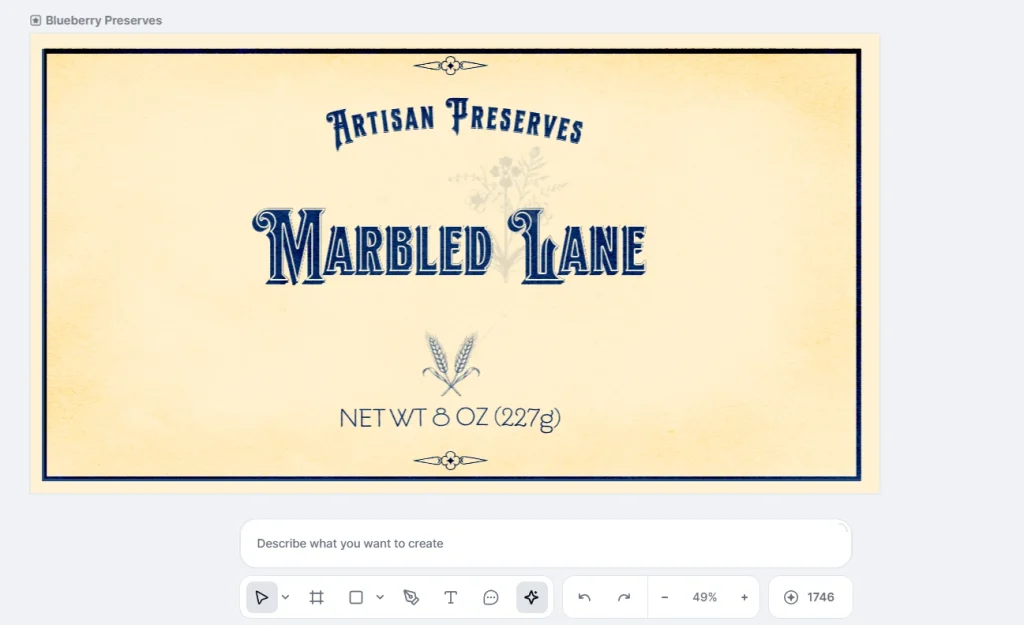
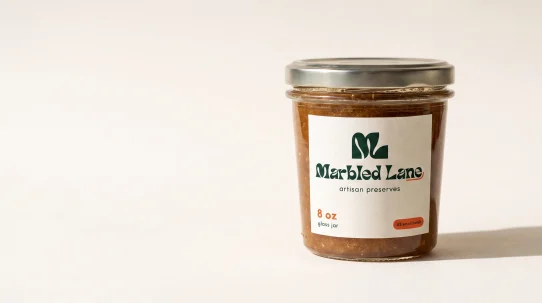
Figure 1Deep customization result. Palette reduced to two colors, ornamentation stripped, one AI-generated wheat illustration vectorized in Kittl.
Every Label & Bind AI Tools review uses the same fictional test brand: Marbled Lane, an artisan preserves brand designed for an 8 oz retail glass jar. The same creative brief is used for every tool to keep comparisons consistent.
This review focuses on Kittl’s template-based workflow because it is the fastest path for most first-time users. Other Kittl workflows are outside the scope of this review.
Two versions were produced from a single community template, Blueberry Preserves.
The first took five to eight minutes. Three text edits and one export produced a finished label ready for production evaluation.
The second took thirty to forty minutes. The palette was reduced from eight colors to two, decorative elements were removed from the frame, an AI-generated wheat illustration was vectorized inside Kittl, a library wildflower was added as a 14% opacity watermark and the file was exported as a CMYK PDF.
Both PDFs opened correctly in Foxit PDF Reader at 100% and 500% zoom. Typography remained sharp, vector edges stayed clean and all elements displayed correctly during inspection.
The deep-customization version consumed 20 tokens from the monthly allocation of 2,000. At that consumption rate, the monthly allocation would support approximately 100 projects of similar complexity. Simpler template edits require no AI tokens.
First impression vs. subscribed experience
Kittl’s public tool pages present individual AI features such as Image Generator or Vectorizer. After signing in, those features become part of a broader design editor with templates, an AI Hub and post-generation editing tools. This review is based on the signed-in Pro workflow because that is the environment a paying customer actually uses to produce packaging artwork.
What $15 a month actually includes
Kittl Pro sits at $15 a month billed monthly, or $12 a month billed annually. Free is available but the outputs auto-publish to the community and cannot be used commercially. Expert at $35 a month adds token capacity. Max at $65 a month lifts capacity again and removes the 500,000 copy licensing cap. Current pricing is published at kittl.com/pricing.
At Pro the subscriber gets 2,000 AI tokens per month. The default image model, ChatGPT Image 2, costs twenty tokens per generation. That works out to 100 full generations per month at the default model. Cheaper models cost less per generation and stretch the allocation further.
Kittl’s AI Hub aggregates nineteen model variations plus additional options behind a see-more control, drawn from several foundation providers including OpenAI, Black Forest Labs, Stable Diffusion and ByteDance.
Vectorization, template loading, palette editing, text editing and export are token-free. Tokens only spend on AI generation.
The workflow that produced the Marbled Lane label
Kittl’s Labels category opens with a browseable grid. The Blueberry Preserves template appeared under artisan and jam tags. It was built by a community designer, not by Kittl staff. Loading it into a new project cost zero tokens.
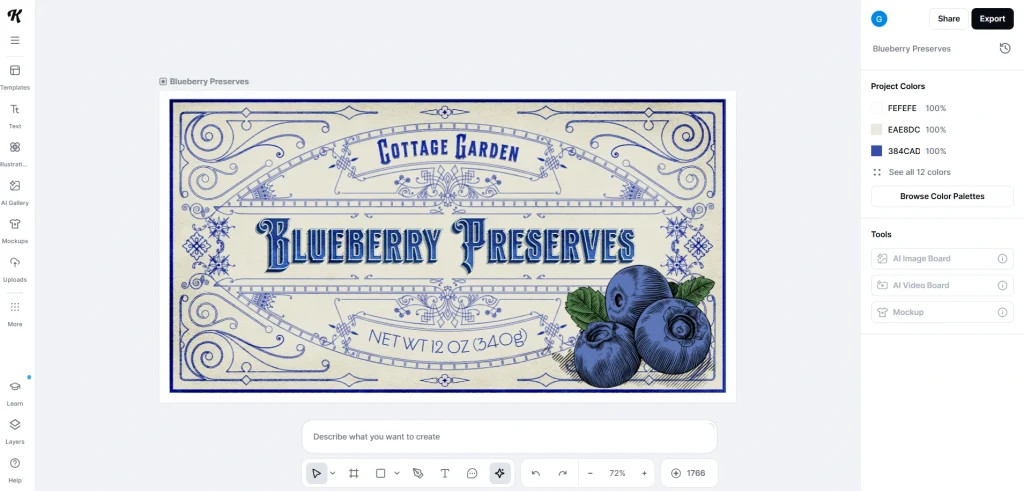
Figure 2The Blueberry Preserves community template as loaded. Twenty-six editable elements before any changes.
The layer panel opened to reveal twenty-six individual editable elements organized into seven semantic groups. Real design file architecture with grouped ornamentation, separate frame and background layers and every text object independently editable.
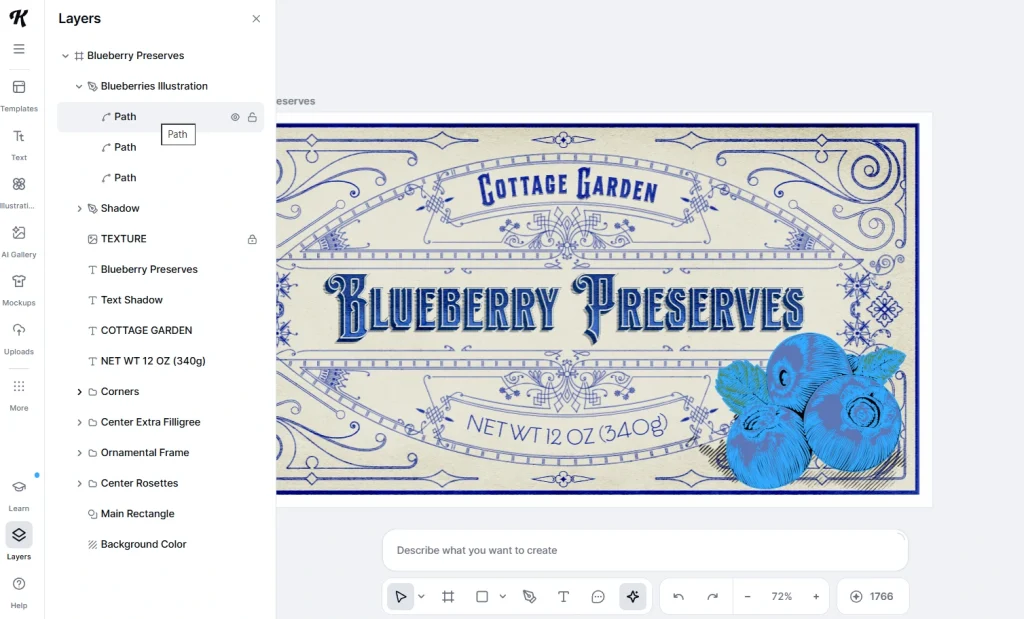
Figure 3Layer panel inspection. Every text object, ornament group and background layer is independently editable.
Fast-swap version
Three text edits: “COTTAGE GARDEN” became “Artisan Preserves” (preserving the arch transformation), “BLUEBERRY PRESERVES” became “Marbled Lane” and “NET WT 12 OZ” became “NET WT 8 OZ.” All other elements preserved. Total time five to eight minutes.
One friction point surfaced. The main wordmark carried a two-object shadow: foreground text plus an offset duplicate. Editing only the foreground left ghost text reading “Blueberry Preserves” visible underneath the new brand name. Fixed by editing both layers. Worth knowing on first attempt.
Deep customization version
Starting from the same template. Goal: move the visual language from Victorian ornate to modern warm premium.
Palette reduction came first. Kittl’s built-in Browse Color Palettes offered curated presets. None matched the two-color brief. The workaround: paste target hex codes into color slots. Kittl auto-consolidated matching values, collapsing redundant swatches. Palette dropped from eight colors to two in seconds.
That workaround required knowing hex codes and knowing that pasting duplicates would collapse the palette. It is not first-run knowledge.
Ornament stripping followed. Layer panel deletions removed the Corners group, Center Extra Filligree group and Ornamental Frame group. What remained: the outer border, wordmark, arch tagline, weight text, two center rosettes and the background.
Library search for “preserves” returned zero results. “Botanical” returned hundreds. A wildflower spray was selected, recolored to the two-color palette and placed at fourteen percent opacity as a background watermark.
One AI generation was used for a wheat sprig accent. Model: ChatGPT Image 2. Cost: twenty tokens. Vectorize applied at the one-color setting produced one clean vector path. The wheat took the palette blue automatically.
Deep customization total: thirty to forty minutes, twenty tokens.
CMYK PDF export at the entry tier
Full Export sits top-right in the Kittl editor. Both versions exported with these settings: PDF format, CMYK color mode, 300 DPI, 4 by 2.17 inches physical dimensions.
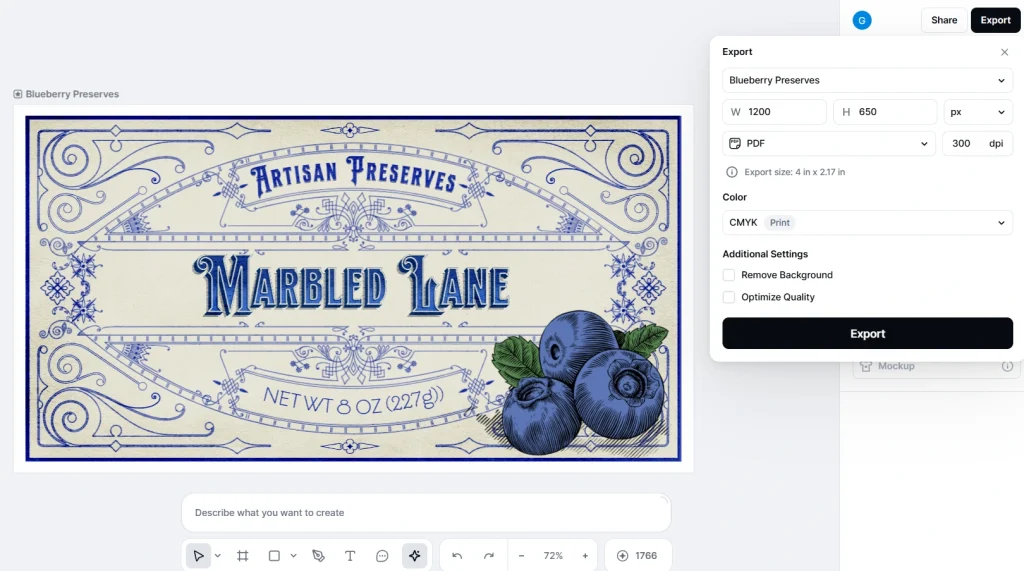
Figure 4Full Export settings used for both versions. CMYK at 300 DPI, 4 by 2.17 inches.
Before the file downloaded, Kittl showed an in-dialog warning: “Printed colors may vary. Printed colors may look different than on screen depending on printer and paper.” A Learn More link opened Kittl’s own educational article on RGB versus CMYK.
This is what a designer expects from professional tooling. Kittl educates the buyer at the moment of export rather than after a bad print run.
Testing note
Foxit’s zoom ceiling is 500%. Findings describe how the exported files parsed in that renderer.
The output files opened in Foxit PDF Reader, a free independent renderer. At 100% zoom every element rendered correctly. At 500% zoom, Foxit’s maximum, letter outlines stayed sharp on the wordmark. The vectorized wheat held its edges.
Kittl does not add bleed or die lines by default. Both would be added at print-shop level or as a separate manual step before submission to a digital label printing supplier.
Production Reality Check scorecard
Ten points. Pass / Partial / Fail.
Design quality
- Packaging suitability: Pass. Templates exist for the label category with hundreds of options across sub-categories.
- Typography rendering: Pass. Sharp at 500% renderer zoom.
- Small-size legibility: Partial. Foxit at 500% supports readability but a physical print at final size gives a stronger answer.
Production readiness
- Vector export: Pass. PDF preserves vector elements as editable paths.
- RGB to CMYK conversion: Pass. Proactive color-variance warning before export.
- Transparency handling: Pass. Individual element opacity controllable.
- Print readiness (bleed, die line): Partial. Not added by default. Add at print-shop level.
Business practicality
- Editing flexibility: Pass. Twenty-six individual editable elements on the test template.
- Commercial license: Pass at Pro. Paid plans grant commercial-use rights.
- Workflow speed: Pass. Five to forty minutes depending on customization depth.
Overall: 8 Pass, 2 Partial, 0 Fail
Kittl Pro $15/month. Template workflow. Tested July 2026.
Printer Acceptability verdict: Level 1. Printer Acceptability assesses whether an exported file would move into commercial production without a rebuild, looking at file structure, print setup and editability. A modern digital label printer would accept both Marbled Lane files as supplied. Bleed would be added at print-shop level for final production. The file structure itself does not require reworking.
Where this leaves the small business buyer
Want a first retail-ready label mockup fast: Kittl fits. Templates plus text swap gets a shareable prototype in an afternoon.
Want print-ready labels without hiring a designer: Kittl handles the file mechanics. Plan for a light prepress pass to add bleed and die line before submission.
Producing dozens of labels per month: twenty tokens per default AI generation gives 100 generations per month at Pro. Template edits and vectorization stay token-free.
For a vector-native comparison at a similar price point, see our Recraft AI review covering the same Marbled Lane brief.
Operational verdict
Best for small-batch product operators who want a template-based path to a print-shop-ready CMYK label for $15 a month and are willing to spend an afternoon learning the Kittl editor.
Less suitable for teams expecting fully automated, one-shot AI generation with minimal pre-press preparation.
Fine print
Kittl Technologies GmbH is based in Berlin, Germany. Paid plans grant commercial-use rights, but the public licensing documents primarily discuss AI-generated images rather than AI-generated vector output. Commercial guidance for vector assets appears in product documentation rather than the primary legal terms. Kittl’s public legal documents are not date-stamped, so Label & Bind assigns a Medium confidence rating to licensing findings and recommends readers review the current terms before commercial deployment.
Legal note. The Fine print section summarises Label & Bind’s reading of Kittl’s publicly available documentation as of the review date. It is provided for informational purposes only and is not legal advice. Readers should review Kittl’s current terms before making commercial decisions.
Methodology
Kittl was tested using the Marbled Lane preserves label brief at the Pro tier ($15 per month, subscribed July 2026). Test environment: Chrome 149 on Windows 11 25H2. Exported PDF files were evaluated in Foxit PDF Reader, a free independent renderer, at 100% and 500% zoom. Findings describe how the exported files parsed in that environment. Where a finding could materially depend on the rendering engine, it is noted. Full testing evidence, token logs and file inspections are held in internal records.
Frequently asked questions
Can I use Kittl designs commercially at $15 a month?
Yes on the Pro tier and above. Kittl’s paid plans grant commercial rights for client work, packaging, merchandise and print-on-demand. Free tier outputs are not eligible for commercial use because they auto-publish to the Kittl community library.
Is the Kittl AI Vector Generator page the same product as the app editor?
No. The standalone product page at kittl.com/tools/vector-generator is a single-purpose interface for one AI tool. The signed-in editor at app.kittl.com is a full design environment with template library, multiple AI models in one AI Hub and post-generation tools including Vectorize.
Does Kittl export CMYK PDF at the Pro tier?
Yes. Full Export inside the editor offers CMYK color mode selection at PDF format. Kittl shows a proactive color-variance warning before the file downloads.
What happens to my designs if I cancel Kittl?
Kittl’s terms indicate that commercial rights on existing designs survive cancellation. Specific behavior on account deletion or downgrade is not explicitly detailed in the public license; readers should review current terms before making a change to their subscription status.
How many labels can I make per month at $15?
Unlimited if you work from templates without AI generation. About 100 per month if every label includes one generation with the default AI model at twenty tokens per generation.
Editorial Independence
Label & Bind purchased the Kittl Pro subscription used in this review at standard consumer pricing. This review was not sponsored, commissioned or reviewed by Kittl. As of the publication date, Label & Bind has no affiliate relationship with Kittl.
Testing Scope
This review reflects hands-on testing of Kittl Pro in July 2026 using a packaging label workflow. Features unrelated to creating, exporting or preparing packaging artwork for commercial print were intentionally excluded. Product features, pricing and behavior may change over time. This review evaluates Kittl as a packaging production tool. Questions relating to copyright, trademark registration and other intellectual property matters fall outside the scope of this review.
Corrections
If you spot an error or believe we missed something important, contact us at labelandbind [at] gmail [dot] com. We review new evidence and update articles when appropriate. Material corrections are logged with the publication date.